
EndoManager® and Epic Seamless integration with Epic and Lumens
EndoManager EMS sends endoscopy images captured in the procedure room straight into the Epic Lumens procedure note, with no separate VNA. It takes orders, scheduling and patient updates from Epic, puts the patient on the room's worklist, and forwards images to Lumens and Epic Gallery.
Epic Showroom Listing
| Designation | Listing name | Category | Version | Link |
|---|---|---|---|---|
| Toolbox | EndoManager EMS by NewCura | Endoscope Data Capture | 1.0.5 | Listing 3848 (opens in a new tab) |
What Toolbox means
Epic describes the Toolbox designation as: "Products in specific categories that follow Epic recommended connection practices for a category."
Epic describes the category: "Endoscope data capture integrations allow vendors to gather data from a scope, format it, and then send it downstream. Currently, Epic is focused on image data, though that will expand to video, event, and other data in the future. This data is used throughout Lumens workflows, e.g., documenting findings or writing a procedure note."
Source: Epic Showroom, listing 3848 (opens in a new tab).
How images get from the scope to the Lumens note
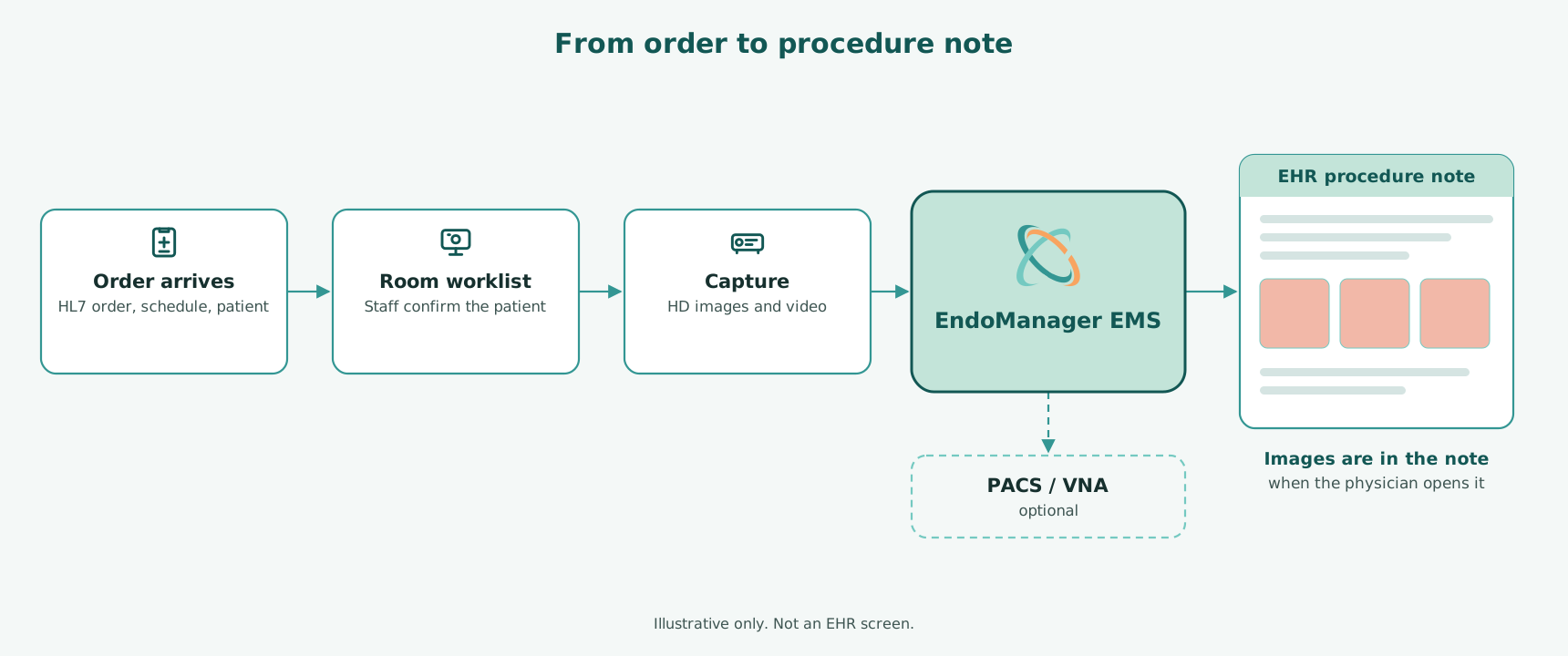
- EndoManager receives HL7 orders from Epic.
- The patient is on the room's worklist. Cameras and processors with native DICOM worklist support get the worklist from EndoManager directly. Rooms whose equipment doesn't support DICOM or worklist use a capture station at the tower, where staff pick the patient from the same worklist.
- The patient is confirmed in the room. Patient demographics show on the physician's procedure monitor before capture on supported devices only.
- Images come back to EndoManager. DICOM devices send them by C-STORE or C-MOVE; capture stations send them directly. EndoManager stores them.
- EndoManager forwards to Epic. Images go straight into the Lumens procedure note, and to Epic Gallery where used, over HL7 MDM or file sweep. No separate VNA is required.
- The physician documents. Images are already in Lumens when the procedure ends. No extra clicks.
Where EndoManager shows up in Epic workflows
Lumens
Images are available in the Lumens procedure note as soon as they're captured, so physicians select and document findings without leaving Epic.
Epic Gallery
EndoManager sends images to Epic Gallery, over HL7 MDM or file sweep, for organizations that keep clinical media there. The EndoManager capture station can also send straight to Epic Gallery on its own, without the full imaging back end. See Epic Gallery.
Delivery methods
Depending on the destination, EndoManager forwards to Epic by API, HL7 MDM or file drop.
Why imaging without a VNA matters
Many organizations moving endoscopy documentation into Lumens assume they need to buy and run an enterprise archive before go-live. With EndoManager they don't.
- Fewer systems on the critical path. Images go from the room to EndoManager to the Lumens note.
- No archive purchase just to go live. EndoManager stores the images itself.
- Keep the option. If your organization runs a PACS or VNA, or plans to, EndoManager routes to it. Your archive policy decides, not your imaging vendor.
Every scope brand, one Epic workflow
Most endoscopy departments run more than one scope brand. EndoManager works with Fujifilm®, Olympus®, Pentax® and other camera systems, so every room feeds the same Lumens workflow whichever tower is in it. Modalities include endoscopy, bronchoscopy, endoscopic ultrasound (EUS and EBUS), fluoroscopy and FEES.
Related
Integrations Builder · Epic Gallery · Showroom and Toolbox listing facts · EndoManager EMS · PACS and VNA · Endoscopy equipment
Epic and Lumens are registered trademarks of Epic Systems Corporation. OpTime® and Epic Showroom™ are trademarks of Epic Systems Corporation. Olympus is a registered trademark of Olympus Corporation. FUJIFILM is a registered trademark of FUJIFILM Holdings Corporation. PENTAX is a registered trademark of HOYA Corporation.
Frequently asked questions
Does EndoManager integrate with Epic Lumens?
Yes. EndoManager EMS sends captured images straight into the Lumens procedure note, so they're there when the physician documents. No separate VNA is required.
Is EndoManager in Epic Toolbox?
Yes. The listing "EndoManager EMS by NewCura" has Toolbox status in the Endoscope Data Capture category (listing 3848 (opens in a new tab), version 1.0.5, checked 11 October 2026).
What is Epic Toolbox?
Epic describes Toolbox as "products in specific categories that follow Epic recommended connection practices for a category." It is one of the designations on Epic Showroom.
Does Epic endorse EndoManager?
No. Epic states it "does not endorse, certify, or verify the integrity, safety, performance, or practices of this developer or their software." Toolbox status means EndoManager is listed in a category that follows Epic's recommended connection practices.
What does EndoManager receive from Epic?
HL7 orders. EndoManager uses them to build the room worklist, so images are tied to the right patient and order from the start.
Do we need a VNA to get endoscopy images into Lumens?
Not with EndoManager. It stores the images and sends them straight to the Lumens procedure note. If your organization requires an archive, EndoManager can route copies to your PACS, VNA or Epic Gallery.
Does EndoManager work with Epic Gallery?
Yes. EndoManager sends images to Epic Gallery over HL7 MDM or file sweep (see Epic Gallery), and the EndoManager capture station can send straight to Gallery on its own.
Does every room need a capture PC?
No. Cameras and processors with DICOM worklist support connect straight to EndoManager. Only rooms whose equipment doesn't support DICOM or worklist need a capture station.
Which scope brands work with EndoManager and Lumens?
Fujifilm, Olympus, Pentax and other camera systems, including mixed fleets in the same department.
How long does a Lumens imaging go-live take?
It depends on the number of rooms, interfaces and any data migration. We'll give you a project-specific estimate during your demo.
Who do we call if something goes wrong after go-live?
NewCura. Call 866.578.5713. Real people answer, 24/7/365. Urgent issues go to on-call NewCura staff. You can also open a case from the Support page.
Last reviewed .